Saturday, August 28, 2021

Reallusion Character Creator 3.43


Design unlimited fully-rigged 3D characters for real-time animation


Character Creator 3 is a full character creation solution for designers to easily create, import and customize character assets.

Connect industry leading pipelines into one system for 3D character generation, animation, rendering, and interactive design.


Reallusion Character Creator 3.43.4315.1 CGP

Link(s):

https://mega.nz/file/y5d3WQYS#aVunP3Af5MqPheqdiwaa4YH5PSF9cZgMxB1EO_rmff8


Reallusion Character Creator 3.43.4315.1 Update with Patch

Link(s):

https://mega.nz/file/D8UlSCbL#9U2jQ9v7rhcnCcq0bxXAJKPeULXMrFRDxsQCrk7oEv4


Reallusion Character Creator 3.43.4315.1 CRACK Only

Link(s):

https://mega.nz/file/S0V1FCKQ#TvaAHWNloxxfF91_fKqeMsL3i6XxSacLuG9_9lBrDOs


Reallusion Character Creator 3.43.4315.1 PIPELINE EXTENSION

Link(s):

https://mega.nz/file/6hVHGSbR#iAphjVVfdzQrmvJVO4UpJtKyq7WR12A46bzcOmT0GVQ


RESOURCES


Reallusion Character Creator 3.4 Resource Pack1

Link(s):

https://mega.nz/file/D4sUAIJT#SLjo3bERDWPmm_qT_sNsBGgHtoqUhB8X3KUChENIS5E


Reallusion Character Creator 3.4 Resource Pack2

Link(s):

https://mega.nz/file/Hw0kSKbK#4TKkL_c5o-twNrQ3zMmpSSFAd8oUAI1WgXB10OK2nh0


PLUG-IN


Reallusion Iray Render Plug-in 1.42 CGP

Link(s):

https://mega.nz/file/SwlWVRwb#nVmavHmFG9gsSsEEWVJkx6zZeWI6Nc1KP18nQ2Y-lV4


Reallusion Headshot Plug-In 1.11 CGP

Link(s):

https://mega.nz/file/nhNAlBCJ#cqOopVrvjtn4zxbdLaFmK7WUFaKCBmULKGvOhB07kVw


Reallusion Headshot Plug-In 1.11 Repack Updated for 3.4

Link(s):

https://mega.nz/file/K1l0mCyQ#qUqNXFR5cMlpxifh9yiJi3lhFsV9GA1AP8ep1A4kadU


Reallusion SkinGen Premium Plugin 1.0 CGP

Link(s):

https://mega.nz/file/yscEWDII#EuvO0mDSdxkD1NVBL4SQ4-ETR65nHGYIbeetO98416Q


Smart Gallery Plug-in 1.2 for Character Creator

Link(s):

https://mega.nz/file/Ts1x2Y4Q#-_5tMsXoeHI09VoY6tuIn0D5Ow8D6lWQ0EVVZNMFOuY


Smart Gallery Plug-in 1.2 for Character Creator REPACK

Link(s):

https://mega.nz/file/7pEijBQI#2k2aWm3FaCmRpLRgEp5-SGdOLP-_7h6OMknkER40SSs


DAZ TO CC3 FBX COLLECTION


Genesis 1 Male Collection (36 Characters)

Link(s):

https://mega.nz/#F!lS4lXICA!TRTyC8Uyf1yZkeU9BUMMvQ


Genesis 1 Female Collection (6 Characters)

Link(s):

https://mega.nz/#F!9Sg3XIgB!2DdYE8YMutiKcotVi2uecg


Genesis 2 Male Collection (41 Characters)

Link(s):

https://mega.nz/#F!oDonEQwT!pQ0NyPewGJ21Vc5FQt5l8Q


Genesis 2 Female Collection (48 Characters)

Link(s):

https://mega.nz/#F!1Oo3WALR!y8d_Wf-9r63xKwQF5eZpog


Genesis 3 Male Collection (81 Characters)

Link(s):

https://mega.nz/#F!cHpBHYTK!lVI6CcrtCcFI7oFYQT1Kkg

Genesis 3 Female Collection (59 Characters)

Link(s):

https://mega.nz/#F!9GQwlA5B!0cTHAqlj1slsGrOQcoqYSA


Genesis 8 Male Collection (61 Characters)

Link(s):

https://mega.nz/#F!pfgV1CJT!dC_kgdmEaiGO33p-rTHSQw


Genesis 8 Female Collection (77 Characters)

Link(s):

https://mega.nz/#F!EL42UIIB!GMjwOm7Dv98EbjlzX2g_Vg


Reallusion iClone 7.92 + 3DXchange 7.81


Reallusion iClone 7.92.5425.1 + iClone 3DXchange 7.81.5515.1 + Resource Pack


Iclone 7 Real-Time 3D Animation Software


Integrated with the latest real-time technologies, iClone7 simplifies the world of 3D Animation in a user-friendly

production environment that blends character creation, animation, scene design and cinematic storytelling...


FULL INSTALLS:

Reallusion iClone 7.92.5425.1 CGP


Link(s):

https://mega.nz/file/G5sURDpB#3hVW5P8EdQHkr1TeA2AUlbUs_U80fIptJnRNRLi-CDo


Reallusion 3DXchange 7.81.5515.1 Pipeline CGP


Link(s):

https://mega.nz/file/y5l2yY4J#6NWPoANibZUvzwvSb5CyQ6CvBbIeY9n-YXkpHLylRqw


UPDATES:


Reallusion iClone 7.92.5425.1 Update with Patch


Link(s):

https://mega.nz/file/KwkTDIiD#LRRc-NWYC1bKYkXz8D2PsX0EuXGX74ghduKyFqRaCsQ


Reallusion iClone 7.92.5425.1 PATCH ONLY


Link(s):

https://mega.nz/file/XhE3mCDB#Py6bvL12sWTgNUVTVKK5B-6b9c5iYuO-M7UuKgrt8kY


Reallusion iClone 7 SELF UPDATING


Link(s):

https://mega.nz/file/C91AhZgT#2OFGaE0npBf8fJ23bZgHyk8s27eIVNcOXs6fMesHaqk


RESOURCES:


Reallusion iClone 7.2 Resource Pack


Link(s):

https://mega.nz/file/ulcggBQD#3q1b7oWwBRNiQ7HZDyurUt5LUy6C7jg9yhCtQV7cpHU


Reallusion iClone 7.3 Resource Pack


Link(s):

https://mega.nz/file/rlM2mbra#Fmk5AeROCDfzVU5QXAthImy2WK5uSqVfJkVVYU4o0H0


Reallusion iClone 7.8 Resource Pack


Link(s):

https://mega.nz/file/TpUGBBLK#3ct5XuAPInaJJ28hmwdl3PMwcNNelIRdRYDpXAVIJZ8


Reallusion iClone 7.9 Resource Pack


Link(s):

https://mega.nz/file/iokQwIiQ#TxwzxVZmSYq7kPeF2WKLhBPXg9xaA04b5V96KAImtKY


PLUG-IN


Curve Editor 1.51 Plug-in CGP


Link(s):

https://mega.nz/file/mg0GjZBR#OprEsySGgNJCl6Ko3s_ril54LZw-dkk3_SvdZDLAFvs


PopcornFX 1.01 Plug-in CGP


Link(s):

https://mega.nz/file/nwsCDQDD#_4xvad7JWEcaravPxDFSTzoHFwpdpH6-_v3kirlD8Xg


Iray Render Plug-in 1.42 CGP


Link(s):

https://mega.nz/file/SwlWVRwb#nVmavHmFG9gsSsEEWVJkx6zZeWI6Nc1KP18nQ2Y-lV4


Smart Gallery Plug-in 1.2 for iClone


Link(s):

https://mega.nz/file/O9sjSKbR#BbnzSGCrlTRgp6qJlqEX4A91kyZglsOjRzFPXrP4_qc


Smart Gallery Plug-in 1.2 for iClone REPACK


Link(s):

https://mega.nz/file/KkEyUbJC#QTWsCirdwD9YHKvousiCvvWdHIJOD1Ir5EPQ1daO1IE


Unreal Live Link Plug-in 1.3 CGP


Link(s):

https://mega.nz/file/n19WlY5K#oFQecEmPwOBLnQ7yZKLIAuinkrKwpTtEdaLioIUPgGo


MetaHuman Live Link Kit for UE4.26


Link(s):

https://mega.nz/file/ehkgjY4a#Ox04WyegyPMlFfIUbXRDoHoN0dyIMXF-2OXDJYVgxNg


Motion LIVE Plug-in 1.1 CGP


Link(s):

https://mega.nz/file/f4tWHKaJ#Q4pW4DCUde_Oj8KXhSdx0q0WnhJKCc2IAnXA8DPZkT4


Faceware Realtime For iClone 1.1.0.380 TRIAL INSTALL


Link(s):

https://mega.nz/file/HosWFLqL#66XC2LH9K8M8d9l97JM4wikNVd9-ZE0lrRp56Qubmbo


Facial Mocap 1.1 for Faceware


Link(s):

https://mega.nz/file/XplCxBSb#YGd7m9XV6k_O2iZGCAXZVJFLLni2t1fa0oCIoEnfOIg


PROFILES


LIVE FACE Profile 1.05


Link(s):

https://mega.nz/file/Tot0SIDa#0vgML1DELwZiMoWLz2CnTYIRAJ0TM-BL17g6mMvbZu8


Faceware Profile 1.03


Link(s):

https://mega.nz/file/qp0gDSBC#pnkZ6TdVUElCDws0Hmi-Hi4eK1n2rosnXKj8Vpq3GUQ


Leap Motion Profile 1.1


Link(s):

https://mega.nz/file/Lt1wjJyT#XYLJP0IN0VLV5e0J58imAXiu7ROaedxo1KisLsAxOCM


Perception Neuron Profile 1.02


Link(s):

https://mega.nz/file/W41WlSbK#UnJBxHpclPWuqX9oIu4PIHGpjUWxyEH9kNHSt2ZPtbg


Xsens Profile 1.03


Link(s):

https://mega.nz/file/mltCTbaZ#JGBujUVMJKaW3CGw6QuPZYnWEi0HcE2THH01Tv6g-sg


Optitrack Profile 1.02


Link(s):

https://mega.nz/file/alkGhLpT#2_7K7myLlveI5JSmzNIx3NM-5_35OMPS9-zF4DEtWhg


Qualisys Profile 1.01


Link(s):

https://mega.nz/file/G8lgADAD#foWoTaHFmyv01wy0mFmIK3J3Zl3TUObN2phTkOscPwo


Rokoko Profile 1.12


Link(s):

https://mega.nz/file/bkkWTaxR#E_inCJTWJGmDCC_PGHv378-Ln6z2HeHZEubSJlbm9bc


Rokoko Smartgloves Profile 1.02


Link(s):

https://mega.nz/file/Cp0QnSJJ#uGGH2wAGUW3fcDQ5IntiBvHQNBepUuCLuETj1bdHI30


HOSTS:


Link(s):

https://mega.nz/#!m8tkDQSa!X-HESVOacze4cFIZ6MsxPmoyTi9WaEr3X4dYkcNkxQM


Auto-Rig Pro


What is Auto-Rig Pro?


Auto-Rig Pro is an addon for Blender to rig characters, retarget animations, and provide Fbx export, with presets for Unity and Unreal Engine. First developed as my own in-house rigging tool, i've released it a few years ago and it expanded quickly thanks to great support from the community!

Want to try first? Download Mike, free character rig here.

Rig features demo

Getting Started with Auto-Rig Pro:

Youtube Channel - Documentation - Frequently Asked Questions


Rig fast with the Smart feature
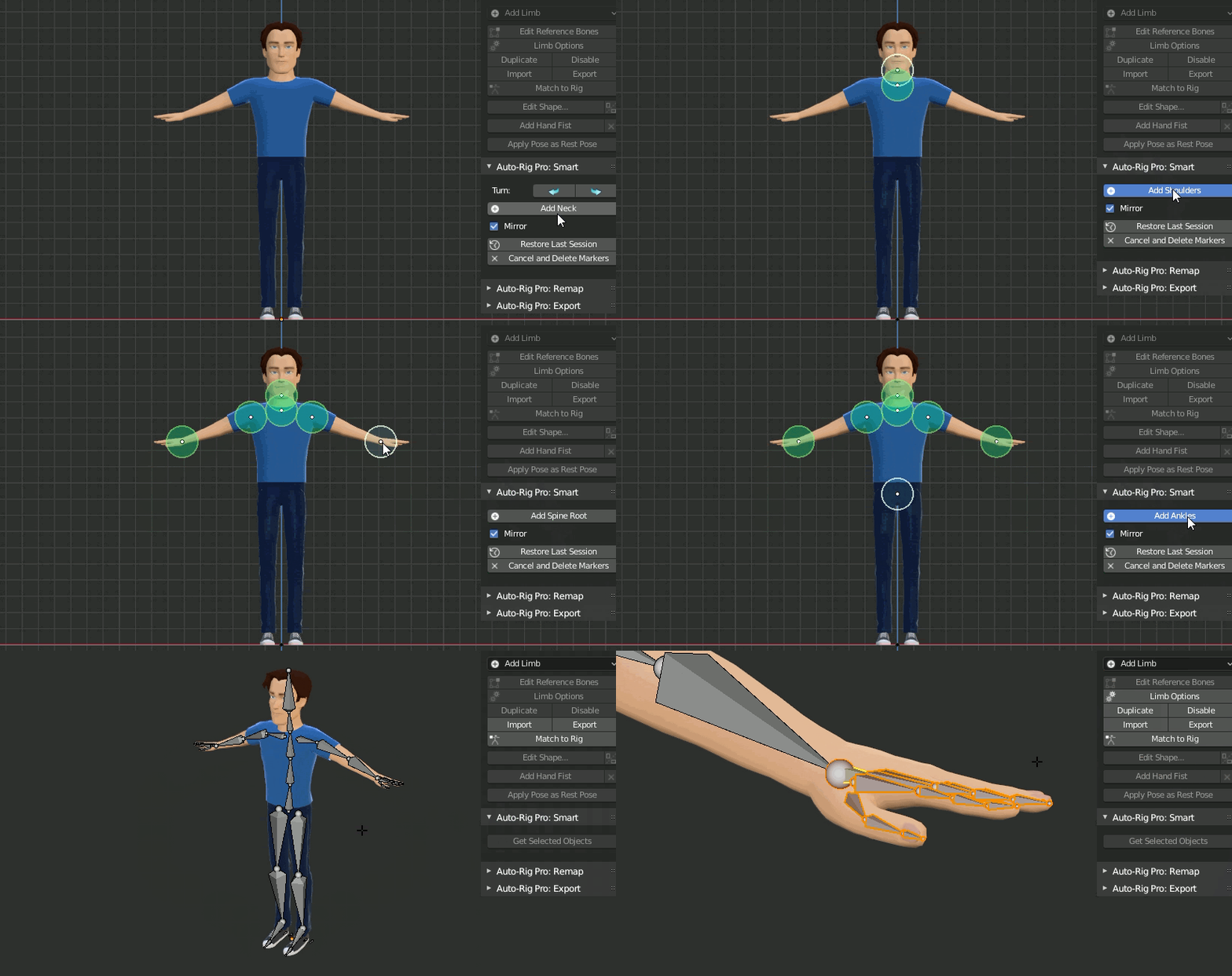

For humanoid characters, the Smart feature can automatically place the bones to speed up the process, after adding the green markers. The result remains editable.

Non-humanoid characters can also be rigged without the Smart feature, manually (horse, dog...).

Based on a non-destructive workflow, the final rig remains easily editable anytime after its generation. Check the product documentation and the youtube channel for more informations.

Built for performances, allowing fast animation playback.

Character examples: Mike (free)AnnaKevin Nina and Alex

Important note about skinning: If possible, use water-tight geometry for best auto-skinning results. Knowing the bases of Blender's skinning tools, weight painting, to fine tweak the bones influences is recommended. Read the doc for more informations.

If you encounter any bugs please report it. Updates are free and will remain free. Also make sure to read the FAQ and the documentation to solve common issues.


Modular - Fully Featured

Customize the rig definition in a few clicks: fingers, wings, toes, spine bones, multiple neck bones, tail, breasts, ears and much more. Duplicate or remove limbs to rig spiders, centaurs... or whatever!

Video tutorial, rig a centaur with the multi-limb feature: Centaur Rig


Wings limb for advanced feathers rig: 
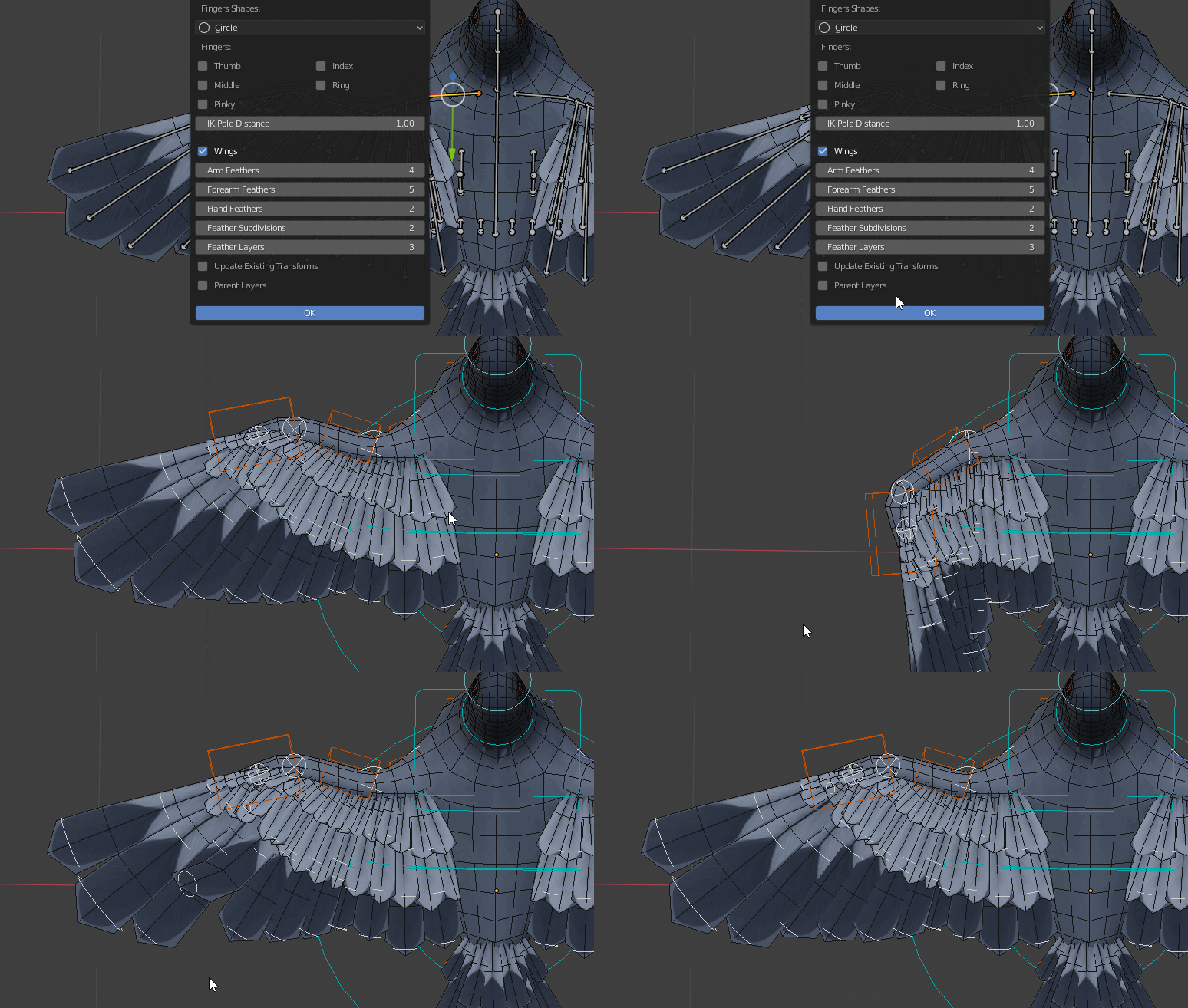

Spline IK limb to rig ropes, tentacles, IK spine...


Advanced Spline IK


3 bones IK for quadrupedal creatures:


Fingers IK-FK:

Intuitive tool to edit the bone shapes, with automatic mirror:


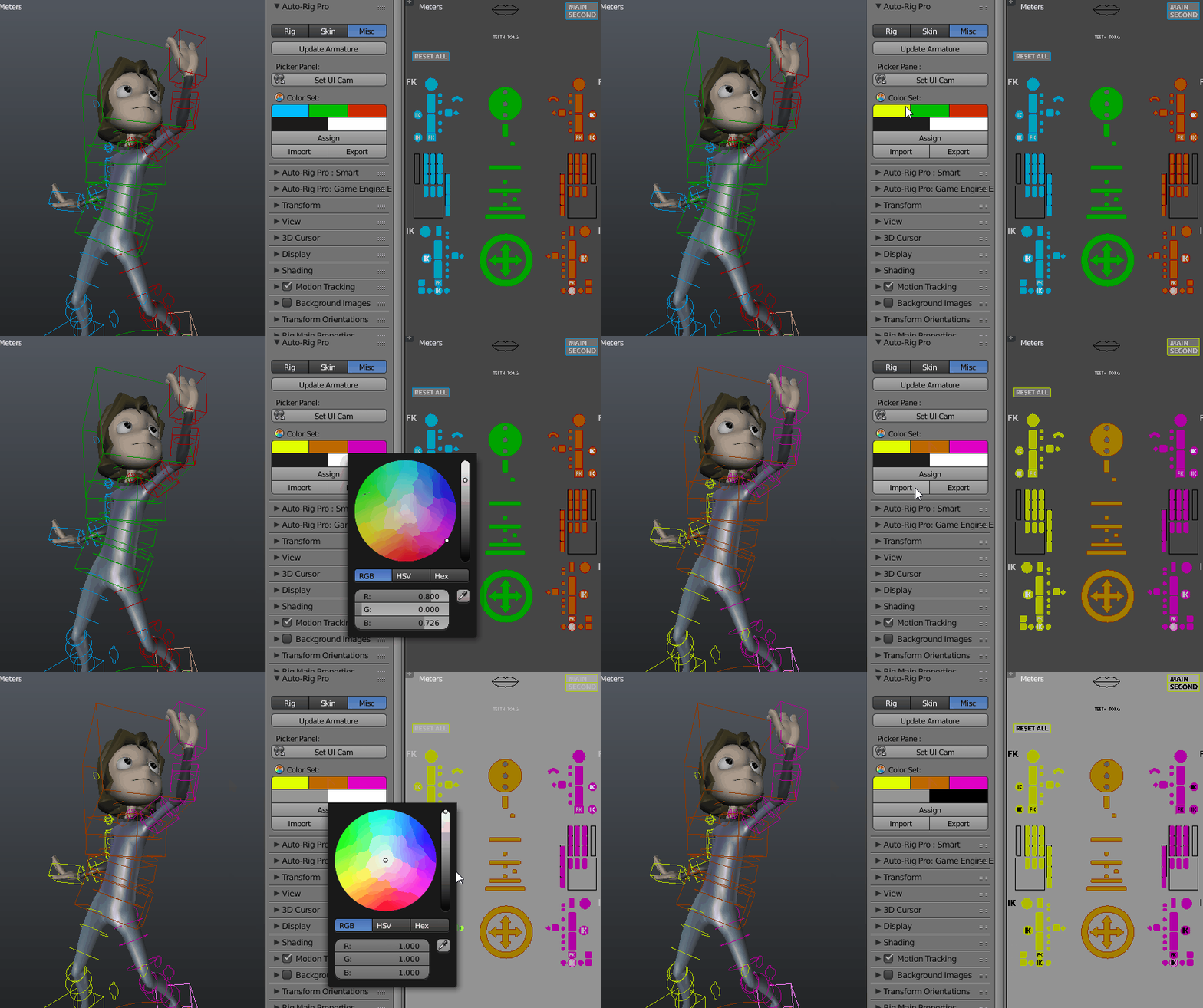
Customizable UI: fully editable layout, buttons positions, colors, background pictures... The picker panel dynamically updates, so you can select any bone from the separate panel easily.


Remap

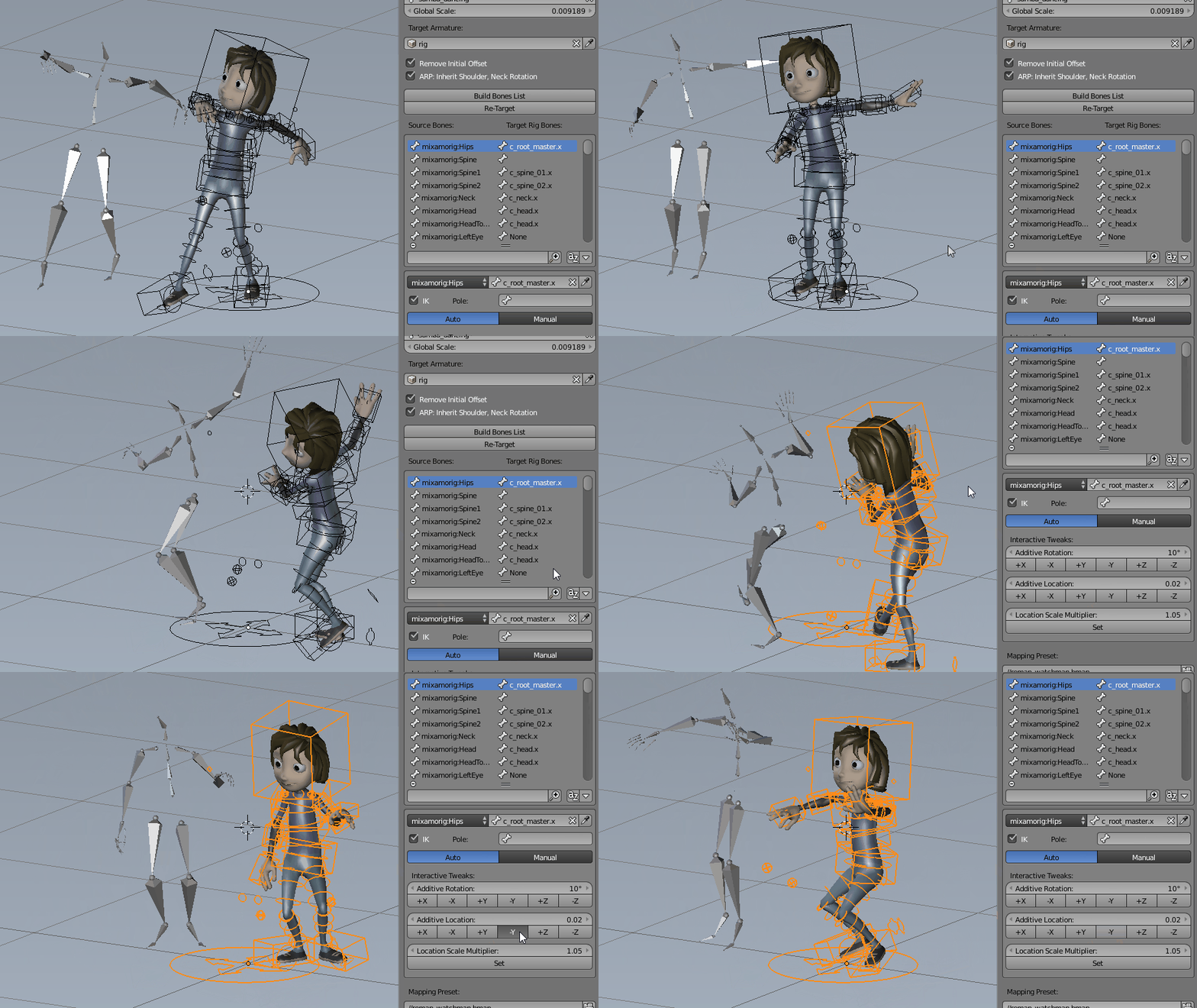
The Remap feature allows retargetting of any armature action to another one, with different bone names and bone orientations, supporting imported .bvh/.fbx armatures for example. It's universal: works with Auto-Rig Pro, Rigify, custom rigs... Define the source armature, the target armature, and the animation will retarget according to the bones names matches and bones original orientation.

It support IK feet, hands for accurate motion tracking, and an interactive offset tool to remap to different characters proportions.

Video: Remapper demo


Game Engine Export

Auto-Rig Pro allows export to FBX format via a dedicated module, to proven engines such as Unity or Unreal Engine.

3 export types: Universal to export a simplified bones hierarchy for any creature, Humanoid for bipeds only, with options for easy retargetting and root motion, and Generic to export the deforming bones and the non-deforming ones if they are parent of the deforming bones.

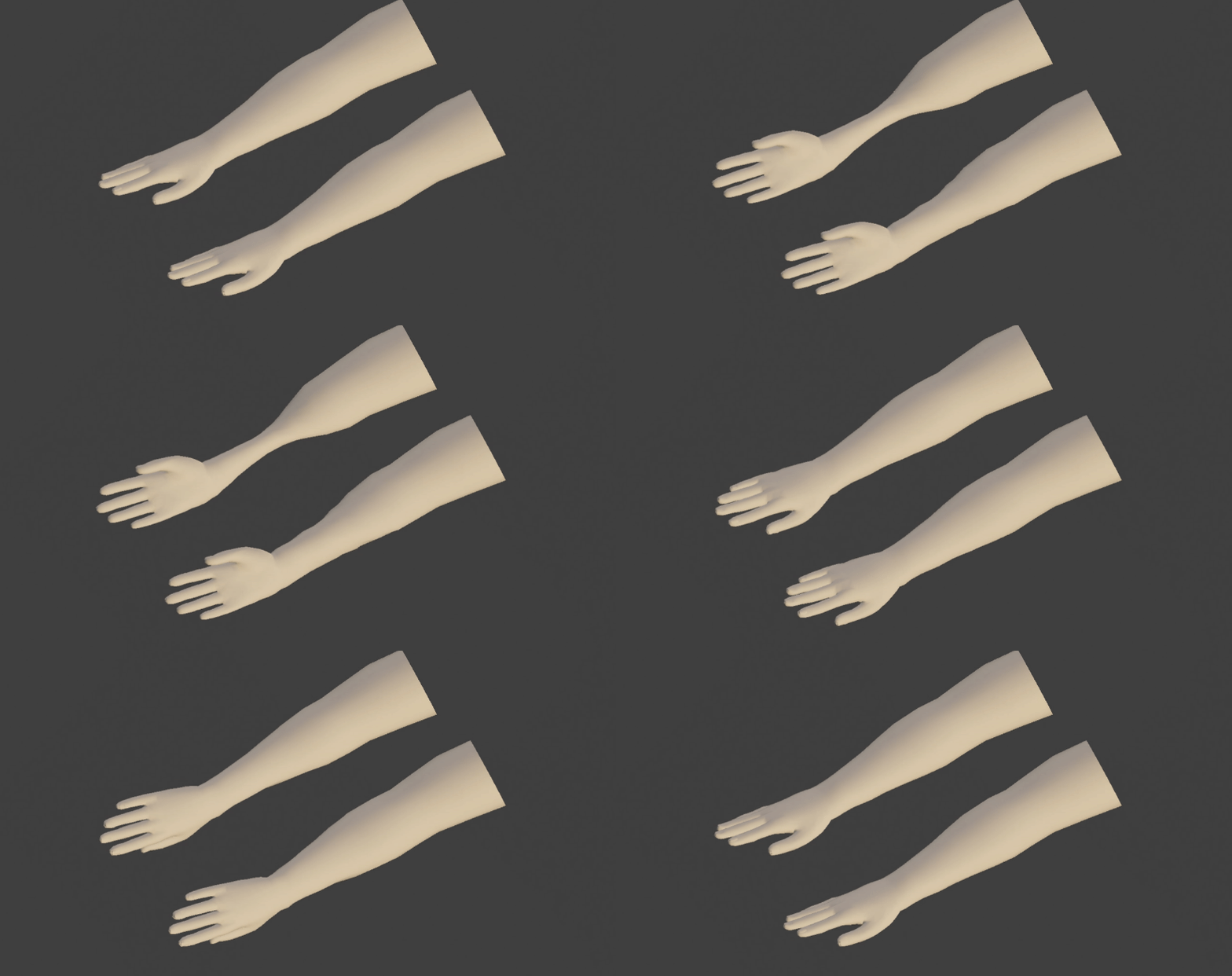
  • Support of multiple twist bones for optimal volume preservation in game engines, where dual quaternions skinning is not possible (top: single twist bone, below: 4 twist bones)


  • Unit conversion to initialize the scale transforms values to 1.0 in Unity and Unreal Engine
  • Unreal Mannequin compliant: support Mannequin bones hierarchy, bone axes conversion, bones naming
  • Automatic A-Pose
  • Support full facial rig, and advanced bones. "Twist" mode for secondary controllers, wrapped on bendy-bones for smooth curves effects, leading to 1:1 export compatibility in Fbx format
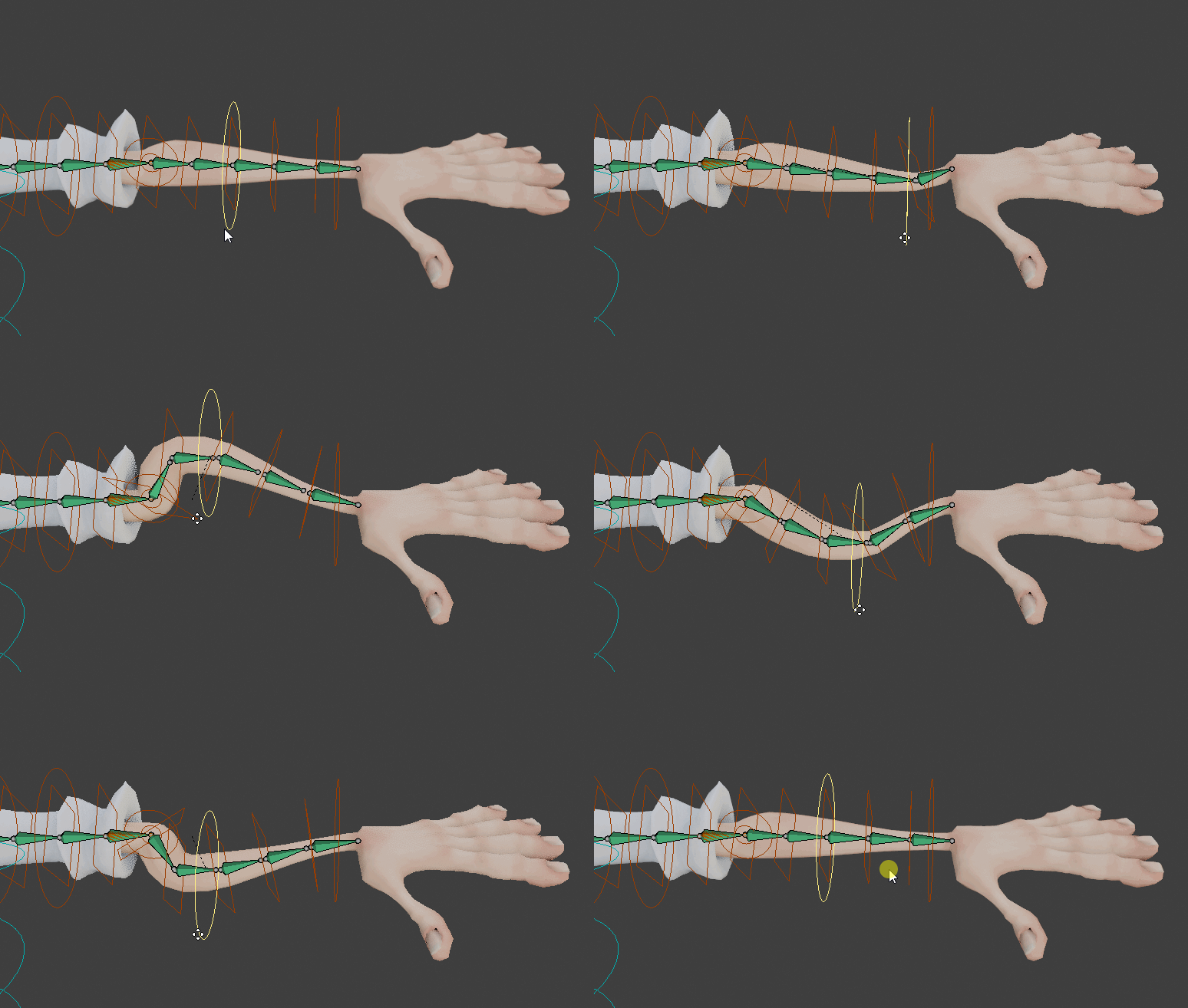

  • "Soft-Linking" for cheap stretchy bone effect, Fbx compliant
  • Actions are baked to the simplified rig
  • Animated shape keys (blend shapes) support
  • Selective/multiple action export
  • Root motion support


Bring your poses to the next level!

The secondary controllers offer a unique control over the pose. Located all along the limbs, they're dedicated to fine pose sculpting, cartoon effects, bending, stretching, etc. Three deformations mode in option: Twist (exportable to Fbx and bendy-bones based for best compatibility), Additive (exportable to FBX), Bendy-Bones (Blender only).

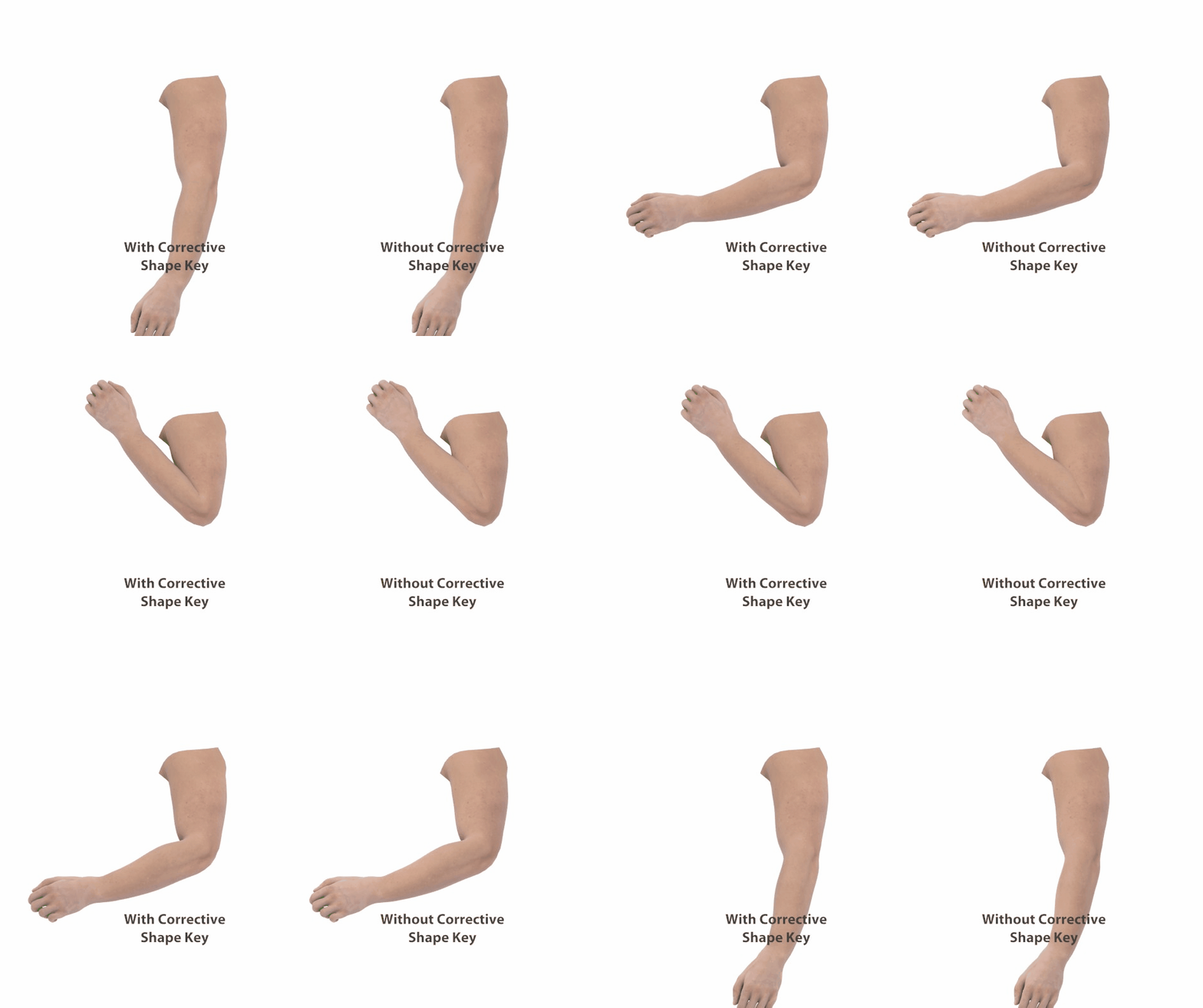
Just use them instead of corrective shape keys, or as a complement. Below a typical leg bent before and after tweaking the secondary controllers.


Corrective shape keys can be created easily with a dedicated tool supporting IK-FK bone chains:

Tell Me More!

Extensive list of what the addon has to offer:

  • Automatic bone placement solver based on mesh recognition for bipeds characters. Asymmetrical models supported.
  • Edit Reference Bones feature to modify the rig anytime you want. No need to redo everything if a bone is not where you want it to be.
  • Apply Pose as Rest Pose feature to quickly change the rest pose of the character, aligning reference bones on it and applying armature modifiers in a single click
  • Modular: only rig what you need. Fingers, toes, ears, breast, adjustable amount of spine, neck, twist bones, tail, and neck bones... Duplicate, remove limbs to rig creatures with multiple arms and legs.
  • Fingers auto-rotation option: bend when scaling the first phalange, pre-defined fist pose
  • Easy controller shape edition
  • Bone picker: Can be turned on/off, import/export presets. Customizable.
  • Colors customization
  • Cartoon compliant: stretchy spine, legs, arms...
  • IK-FK snap autokey compliant, snaps properly when unlocking all the leg/forearm rotation axis
  • IK-FK controllers auto hide
  • Hybrid IK pole / IK arrow vector
  • 2 or 3 bones IK chains for legs
  • Knees and elbows pinning
  • Head rotation locked or free
  • Bend all fingers in one click (fingers grasp), fist pre-defined pose, auto rotation of fingers phalanges from scale
  • IK/FK eyes
  • Auto-eyelid rotation
  • Multiple Child-Of constraints support for the IK hands and feet to change their parent space any time (e.g. if the character is driving a car, hands on the wheel, then grab the car door)
  • Complete set of secondary controllers for fine pose sculpt
  • Advanced facial setup with automated placement
  • Improved skinning based on Blender's heatmaps. Auto-splitting of multiple elements + voxelization. Compliant with the Voxel Heat Diffuse Skinning addon.
  • Shape keys drivers creation tool
  • Game engines support, FBX: Unity - Unreal Engine. Generic, Humanoid and Universal rig type
  • Bone remapper to retarget any armature action to another one, with different bone names and bone orientations. IK support. BVH, FBX files compliant, e.g. Mixamo animations.
  • Compliant with X-Muscle System for realistic muscles simulation
  • By buying this addon you support my work and the Blender foundation, its developers financially. A part of each sale is donated to them. It's worth a big thank you from the open source community, helping Blender remaining free and accessible for everyone! And obviously you ensure the funds for this addon next new features, bugfix. I'm making my best to constantly improve the beast, based on users requests and my own ideas. Have quick look at the release log below. You receive a notification when the addon is updated, and download it for free.


Users Cases:

Auto-Rig Pro is actively used in the film and video-game industry, a few examples:

Usurpator: Video-game (Unreal Engine)

Trail of Nanook: Video-game (Unity)

Team Dronix: TV serie

Gus: french TV serie (in progress)

Julie Jamrock: TV serie (in progress)

Escape Legacy: Ancient Scrolls: Video-game

Mythfits: TV serie (in progress)

And many more!...


Updates:

Make sure to uninstall the current addon before installing the new one and restart blender.

--[3.60.45]--

New/improved:

  • Rig: Mirror shape keys + mirror drivers (support corrective drivers, corrective bones)
  • Rig: Set Auto-Stretch to 0.0 by default to new armatures
  • Rig: IK-FK shapes are now scaled with linear interpolation drivers, to ease selection (before, bones were hidden). To apply to old armatures, click "Update Armature" in the Misc tab of Auto-Rig Pro
  • Rig: IK pole position improved when snapping, now in-line with the knees/elbows
  • Rig: New tweak twist setting for arm and thigh bones, to correct bad twisting with extreme arms/legs angles. To apply to old rigs, click "Update Armature"
  • Rig: A log message now reports detailed changes when clicking "Update Armature"

  • Skin: UI Cosmetic change, skinning features as separate engines
  • Skin: Expose new setting: Smooth Twist Weights, Refine Head Weights (aka "Use Chin" previously), Improve Hips Weights
  • Skin: The Voxel Heat Diffuse Skinning addon is now directly embedded as a binding engine (the addon must still be installed separately), supporting post-skinning improvement features of Auto-Rig Pro.

  • Smart: Improved fingers detection with forearm rotated forward
  • Smart: New options to set spine bones count, straight spine, spine troot orientation upward automatically
  • Smart: Improved automatic knee position for IK pole constraints

  • Export: New "Only Selected Bones" option to export only selected bones (Thanks to Jesper for contributing!)
  • Export: New "Soft Linking" option to maintain animated bones scale to 1, allowing cheap stretch effect in game engines without actually scaling bones which lead to issues (Thanks to Jesper for contributing!)
  • Export: New "Markers" setting for frame range, to export only frames between markers named "start" and "end" (Thanks to Jesper for contributing!)


Fixed:

  • Remap: Incorrect fingers rotations with IK hands
  • Remap: incorrect auto-detection side for right thigh
  • Remap: Overrides compatibility was broken
  • Smart: Fixed incompatibility with fingers detection in Blender 2.92
  • Smart: Fingers detection issues when mesh rotation mode was set to "Axis Angle"
  • Export: Error with unexpected custom properties
  • Export: Bone transforms error when no animations were exported with UE options under certain circumstances
  • Export: Fix offset in animation IK bones transforms
  • Export: Clean temporary actions if necessary by clicking "Check Rig"
  • Export: Soft-Link not applying to stretch bones, while using "Twist" secondary controllers
  • Rig: Deleting the picker was broken
  • Rig: Incorrect rotation of root bones as custom override shapes
  • Rig: Set thigh twist StretchTo to Swing rotation mode for better results


Blender 2.79:

https://www.file-up.org/x5o8zsphz407


Blender 2.8: 3.46.13

https://www.file-up.org/v3detbg6mmei


3.46.17

https://www.file-up.org/yd9h1nfbudq5


Documentation:

http://www.lucky3d.fr/auto-rig-pro/doc/


Thursday, December 18, 2014

RUBBERIZE IT! V1.0 - AESCRIPTS

[​IMG]


Rubberize It!
Rubberize It! is remarkably simple and flexible. Just place puppet pins on your layer, select a material and click Rubberize! When you animate your layer, Rubberize It! will squash and stretch it as if it were made of rubber, vinyl, goop or whatever material you select. There are eight materials to choose from or your can experiment and mix your own.

It works by displacing the puppet pins based on your layer's acceleration. That means it can automatically react to changes in your layer's position, rotation and/or scale. It even works with motions inherited from a parent layer.

Powerful yet intuitive, the UI was built with ease of use in mind and offers a quick learning curve. Changes are fast to make and apply. Works with type, stills, video, shapes, vectors or most other type of layers you can put puppet pins on. Make sure to check out the Tips & Tricks section in the FAQ in the Knowledge Base.

Features:
8 different material presets
Sliders to create your own materials
Combine multiple materials on one layer
Chaos feature adds randomized element to materials
2 Formulas for two different types of reactions
Smart Rubberize! Button
Clean button will delete expressions from selected pins
Bake function to speed preview and rendering
Very short learning curve

Compatibility After Effects CC 2014, CC, CS6, CS5.5, CS5, CS4

Link(s)
Code:
https://www.fshare.vn/file/SHPW3HVPMPHX

JOEALTER SHAVE & A HAIRCUT V9.0V01 FOR MAYA 2012-2015 (WIN64)

[​IMG]


JoeAlter Shave & A Haircut v9.0v01 for Maya 2012/2013/2013.5/2014/2015 - Win64

Joe Alter Shave and a Haircut is a plugin for Maya, that creates extra realistic hair and fur surfaces. With this, you can create furry animals, grasses, haircuts, mustaches and so on. And this is not only about extra rendering-realistic, but also extra dynamic-realistic hair/fur. Combining advantages from both Maya Fur and Maya Hair modules inside itself, JA S&H is a perfect decision for your production. It makes creating of haircuts much easier with much finer level of control and much less rendering time. S&H also MentalRay- and RenderMan-compatible, so you can create super-photorealistic renderings using with no additional compositing.

Some significant Features :
Maya 2015 Support
Vray 3.0 support
Viewport 2.0 support (for 2014 and 15)
Multi-threaded all guide handling, interactive and dynamics/collision are hugely faster
We've added interactive glsl lighting on display hairs, you can see highlights move around as you do stuff in the vp
We've also added a higher density preview mode that you can -interactively light and move camera around
Transparency in the viewport
Live texture update, you can apply and fiddle with your textures for all channels and see results immediately (no 'texture update' necessary)
Strength slider in the brush tools
Support:
Maya 2012/2013/2013.5/2014/2015
Mentalray, Pixar's RMS, Arnold, 3Delight, Maxwell, and Vray for Maya.


Home Page: http://www.joealter.com/shave.htm

Down-load (Win64)
Code:
https://www.fshare.vn/file/SD9WF8LYROV5
http://ul.to/mm7qx0ck
 Categories :

CYBERLINK POWERDIRECTOR 13 ULTIMATE SUITE - RETAIL

[​IMG]


PowerDirector 13 Ultimate Suite is designed for the video creative expert. It includes 3 award-winning software – fast video editing, PowerDirector, advanced audio editing, AudioDirector, creative color grading, ColorDirector, plus video editoing app, PowerDirector Mobile. With the complete set of creative tools, PowerDirector 13 Ultimate Suite brings film-style color and pristine quality sound, all in a productive workflow.

PowerDirector - World's Fastest Video Editing
PowerDirector provides the most comprehensive tools for high quality video productions, all with easy-to-use features. The new Design Studio tools provides total flexibility to customize your transition effects and titles, while the MultiCam Designer provides the easiest way to switch between MultiCam shots and create MultiCam Collages.

ColorDirector - Color Grading & Adjustment
ColorDirector offers color grading tools that are easy to understand and apply. Enhance and stylize your videos, and correct white balance, adjust tonality and fix exposure problems. All the professional tools you need to get your videos looking better can be found right on your desktop.

AudioDirector - Audio Editing & Restoration
AudioDirector gives you total control over the editing, mixing, and mastering of your video’s soundtrack, sound effects, and even dialogue. Cutting-edge restoration tools allow you to restore and work with files that have audio flaws or imperfections. Seamless integration with PowerDirector allows for faster round-trip editing and reduced production times.

YOU DON'T NEED ANY SERIAL NUMBER.
PLEASE LOOK THE VIDEO HOW TO HAVE FULL VERSION WITH OUT PROBLEMS.


Fixed files and down-load links:
Code:
http://www.megafileupload.com/en/file/584363/Desktop-rar.html
password; 1235

How to: After down-load, extract all files to one folder and copy and past Define.ini to installer folder.